
US coffee guide · Comparisons
xBloom Studio vs Original: Features, Prices and Who Each Suits
Studio offers visible controls and independent weighing; Original emphasizes a metal design and touch-led brewing. Compare the differences that matter before paying more for your home coffee setup.
By Emma Blake · Published October 15, 2026
Disclosure: We may earn a commission from qualifying purchases through xBloom links in this guide.
Studio is our starting point; Original needs a specific reason
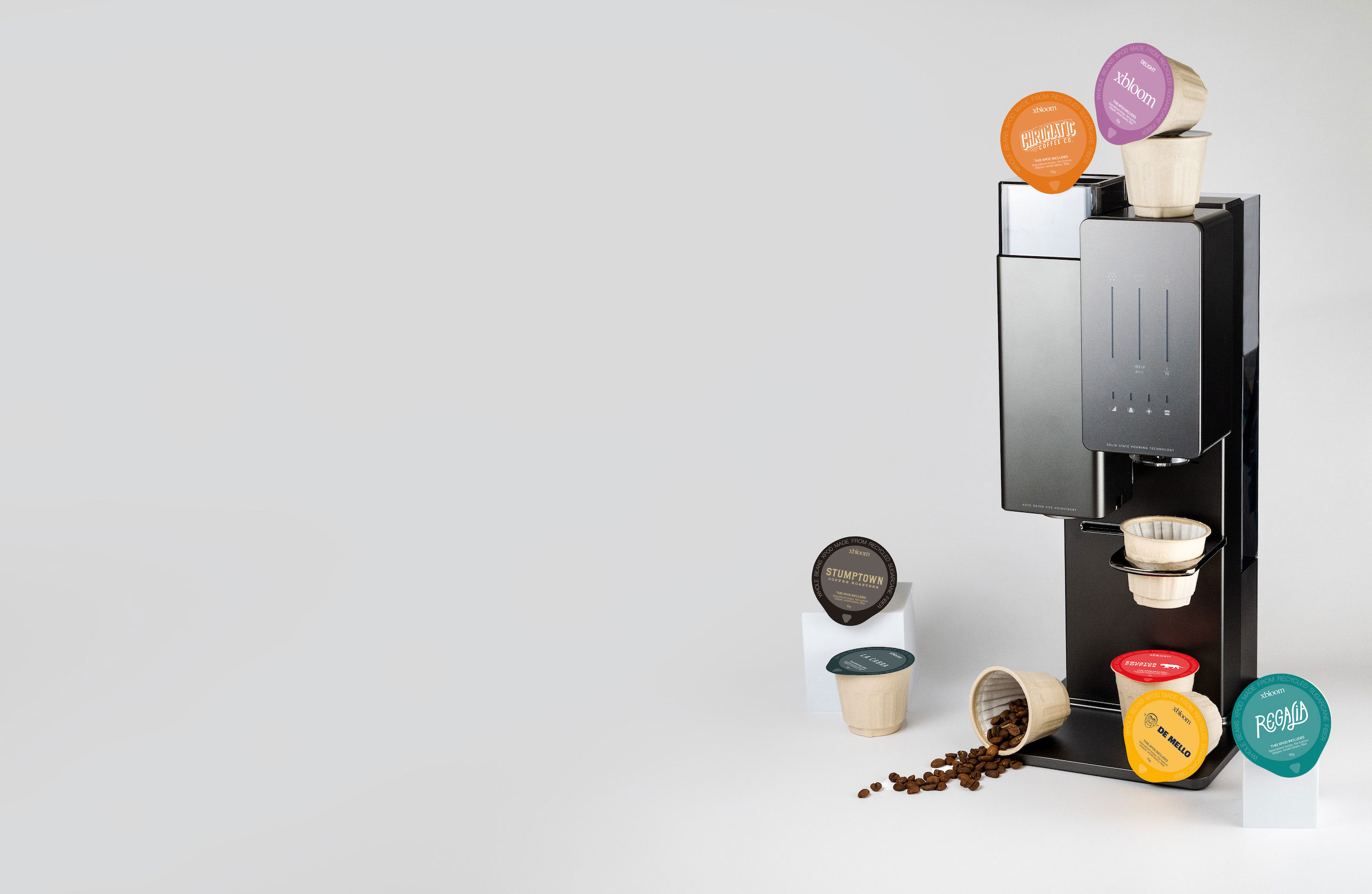
For a new buyer who wants to explore their own beans, we would start with xBloom Studio. Its accessible grinder, brewer and scale modules make it the more direct match for an adjustable home pour-over station. Choose Original when its metal-shell design and touch-led brewing are the particular experience you want, after checking its accessory workflow.
At the US outright-purchase prices checked October 15, 2026, Studio was $599 and Original $799. Original therefore carried a $200 premium in that comparison. That difference does not prove that its coffee tastes better, and we have not performed a side-by-side brewing test. Our recommendation weighs the published functions against how a buyer would use them.
Both are automatic pour-over machines that grind whole beans. Neither model name is a promise about quality: Studio is not merely an accessory for Original, and Original is not a Nespresso Original capsule machine. This page compares the two xBloom models rather than repeating the broader capsule-versus-filter decision.
US outright price, October 15, 2026
- xBloom Studio
- $599
- xBloom Original
- $799
Controls and approach
- xBloom Studio
- Three physical knobs for grinder, brewer and scale modules
- xBloom Original
- Touch controls; advanced customization through the app
Grind adjustment in current specifications
- xBloom Studio
- 80 settings
- xBloom Original
- 30 settings for pour-over
Water reservoir
- xBloom Studio
- 946 ml / 32 fl oz
- xBloom Original
- 700 ml / about 23.7 fl oz
Body and appearance
- xBloom Studio
- Mixed materials; visible front controls
- xBloom Original
- Metal shell and a more minimal front
Own-bean accessory
- xBloom Studio
- Omni Dripper 2
- xBloom Original
- Omni Dripper for xBloom Original
Our editorial starting point
- xBloom Studio
- Adjustable own-bean coffee station
- xBloom Original
- Buyers specifically drawn to the design and touch-led routine
xBloom Studio
Start here for automated filter coffee and the freedom to brew your favorite roaster’s beans.
$599 USD
US purchase price checked October 15, 2026. Prices and offers may change.
Pour-over coffee; does not brew espresso.
See current price on xBloom — xBloom Studio, opens in a new tabxBloom Original
Compare this model if you prefer xBloom’s metal design and xPod-led brewing approach.
$799 USD
US purchase price checked October 15, 2026. Prices and offers may change.
Own-bean accessories must match Original.
See current price on xBloom — xBloom Original, opens in a new tabPhysical knobs or touch controls: which will you actually use?
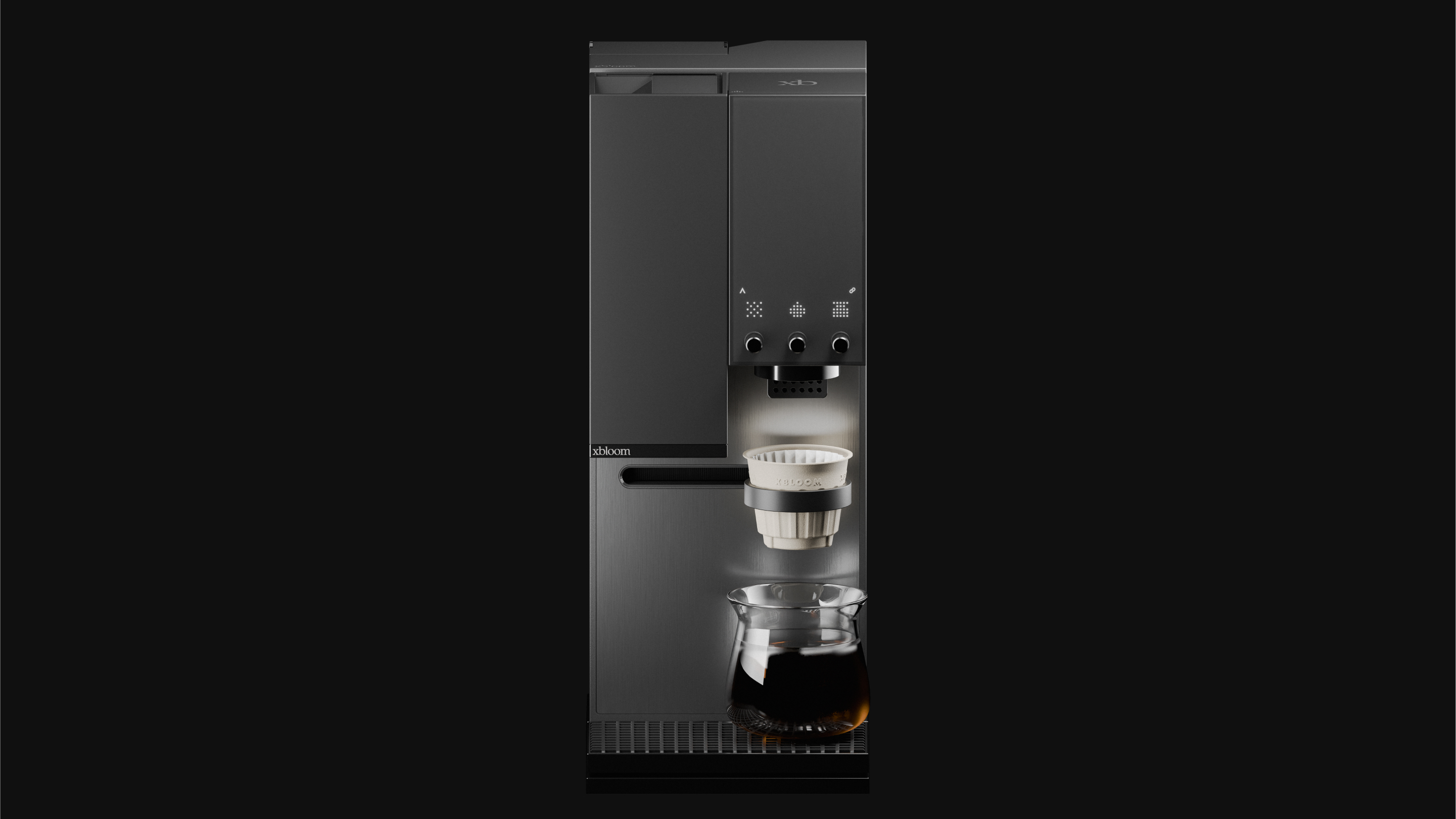
Studio exposes three modules through separate knobs. Its manual explains direct access to grinding, brewing and weighing, and its FreeSolo mode lets those functions operate independently. That is useful when you want to weigh a dose, change a setting or use part of the machine without running a complete automated recipe.
Original also offers on-machine touch controls and app-based customization. Its official FAQ says the grinder can operate separately through the app. Both machines support adjustments and separate grinding; the useful difference is how you access those operations.
Imagine changing coffee on a Saturday. Do you want visible controls that invite you to work through the preparation, or would you rather keep the machine's front minimal and use the app when you need more detail? Watch the controls being used rather than counting buttons. Both approaches can be comfortable when they fit your habits.
For a shared kitchen, let the least interested user take part in this decision. A feature that one person enjoys adjusting may be a point of uncertainty for someone who only wants their usual cup. Agree on a straightforward everyday recipe, then judge which interface makes that routine easier for your household.
What do the grinder and scale differences mean in practice?
The published grind ranges are different: Studio lists 80 settings, while Original lists 30 settings for pour-over. More positions provide a broader adjustment interface, but the count is not a taste score. It does not tell us that a particular coffee will extract better on Studio or that every adjacent step produces a change you will notice.
Studio's independent scale module is a concrete reason to consider it as a small brewing station. You can use weighing as a separate operation, rather than thinking of measurement only as something hidden inside an automatic cycle. If you already own a scale you enjoy using, that advantage may carry less weight in your purchase.
Original's official page describes a built-in scale in its overflow-control system. Studio separately documents a weighing module you can operate independently. Both descriptions involve weighing, but they serve different user functions; choose based on the operation you need.
Choose a control you will use, not a specification to win a comparison. If you regularly adjust recipes, the Studio combination is persuasive. If you usually accept a prepared recipe and want a consistent sequence of actions, the range of settings may matter less than loading, starting and cleaning the machine.
Both can use your beans, but the dripper purchase is different
Original's own-bean option is easy to overlook if you only read its pod-focused promotion. Its official FAQ describes using a reusable dripper and loading a default recipe from an RFID tag, with adjustments available through the app. Choosing Original does not mean committing to buying xPods for every cup.
The accessory names matter. Omni Dripper 2 is the Studio-compatible product; Omni Dripper for xBloom Original is listed specifically for Original. Do not assume an accessory fits both because the store calls each one an Omni Dripper. A spare or replacement should be selected against the machine name and its stated compatibility.
The Studio getting-started manual lists an Omni Dripper 2, an NFC recipe card, a dosing cup and sample filters among its accessories. Check the actual package you order before adding duplicates. For Original, compare the machine package with the separate dripper listing and confirm which parts you will receive rather than treating promotional photographs as a packing list.
If your favorite roaster is the reason you want xBloom, make the own-bean setup the center of your order. Write down the dripper, matching filters and recipe method before selecting optional drinkware or storage. A complete simple setup is more useful than an attractive bundle that leaves the brewing accessory question unresolved.
The reservoir difference is real; the footprint needs more care
Studio's reservoir is listed at 946 ml, compared with Original's 700 ml. That is 246 ml more nominal capacity. It gives Studio more water available between refills, but it is not a guarantee of one extra complete cup: recipe volume, rinsing and the minimum usable water level affect real use.
For a person making one cup at a time, refilling may be a minor task. In a household making several consecutive coffees, it can become more noticeable. Think about where the machine stands relative to the sink and how easy the tank is to handle. Capacity becomes useful when it solves an actual interruption in your routine.
The published height is about 16.8 inches for Studio and 16.9 inches for Original. Do not choose between them on that small height difference alone. Measure the available access above the machine as well as the space occupied on the counter, and allow room for the cup and clearing the dripper.
xBloom lists Studio's dimensions in length/width/height order as 6.7 × 8 × 16.8 inches; Original's page gives 8.5 × 6.8 × 16.9 inches. Rather than assuming the horizontal labels map to the same front-facing orientation, compare the product diagrams when planning a tight space. A small paper footprint check should include the loading direction and surrounding accessories.
When is Original's metal design worth the premium?
Original's metal shell and minimal front are its clearest visual reasons to choose it. Studio presents the controls as part of the design. The photographs can help you decide which belongs in your kitchen, but a metal exterior is not evidence of a longer service life, quieter grinding or a better-tasting brew.
Paying more for a design you will see every day can be a reasonable personal choice. We would describe it that way rather than invent a performance advantage to justify the price. If both appearances appeal equally, compare the control workflow and complete accessory package before choosing Original at the checked price premium.
One buyer may prefer a minimal counter with a single familiar coffee routine. Another may want the machine to feel like equipment they can interact with as they change roasters. These are different preferences, not rankings of how seriously someone takes coffee.
If you are buying a gift, ask which workflow the recipient wants before choosing by the exterior. A beautiful appliance can still be an awkward gift if using their usual beans requires accessories or app interactions they did not expect.
Compare the complete order, then the ongoing routine
At the checked outright prices, the simple machine difference is $200. Start with that figure, then compare included equipment, any required own-bean accessory, delivery, tax and the coffee you plan to buy. Do not add a spare dripper to Studio's total if your chosen box already contains the one you need.
The machine choice alone does not establish a lower cost per cup. If you use the same beans and dose in both setups, your bean arithmetic starts from the same inputs. If one household chooses xPods and another buys bags, it is the selected coffee format and quantity that change that part of the bill.
Maintenance belongs in the decision too. Studio's official guide covers routine cleaning, descaling and calibration. Use the corresponding instructions for Original rather than assuming identical control sequences. You should be comfortable handling used grounds, the filter and the brewing components whichever exterior you prefer.
Check the current warranty and return terms for the exact seller and US purchase option. Brand product pages and older manuals can carry different update dates, so save the terms that apply to your order. A rental or subscription should be evaluated separately from buying outright; a low monthly headline is not a purchase price.
Which model would we choose for each buyer?
We would choose Studio first for someone who wants their own beans, visible physical controls and independent weighing in one setup. Its larger reservoir is also a practical advantage where refills interrupt several coffees. At the prices checked, these features come with the lower machine purchase cost, which makes it the more persuasive starting point for that buyer.
We would choose Original for someone who has seen its touch-led routine, specifically prefers the metal design and is comfortable with the complete accessory and app workflow. That recommendation is about fit. We have no side-by-side test showing a flavor advantage that would independently justify its higher checked price.
If you already own Original and enjoy it, this comparison is not a reason to replace working equipment automatically. List the specific Studio operation you miss. If you cannot name one, keep brewing with what you have. The cost of switching deserves a clearer reason than a longer settings list.
Before ordering either model, confirm three things: the exact US variant and purchase method, the dripper and filters included, and the space needed to load and clear it. Then choose the machine whose routine you would actually repeat. The useful upgrade is the one that makes your preferred coffee easier to enjoy.
xBloom Studio
Start here for automated filter coffee and the freedom to brew your favorite roaster’s beans.
$599 USD
US purchase price checked October 15, 2026. Prices and offers may change.
Pour-over coffee; does not brew espresso.
See current price on xBloom — xBloom Studio, opens in a new tabxBloom Original
Compare this model if you prefer xBloom’s metal design and xPod-led brewing approach.
$799 USD
US purchase price checked October 15, 2026. Prices and offers may change.
Own-bean accessories must match Original.
See current price on xBloom — xBloom Original, opens in a new tabFrequently asked questions
Does Original’s higher price mean better coffee?
The checked US listings were $799 for Original and $599 for Studio. Original emphasizes its metal-shell design and touch-led workflow. Price alone does not demonstrate a taste or durability advantage.
Can both xBloom machines use my own beans?
Yes. Use the model-specific reusable-dripper setup: Omni Dripper 2 for Studio and Omni Dripper for xBloom Original. Confirm the contents of your actual package.
Does Original have no scale at all?
That claim is too broad. Its official page describes an overflow-control scale. Studio separately documents an independently usable weighing module; the functions should not be treated as identical.
Which machine has the larger water tank?
Studio is listed at 946 ml / 32 fl oz, while Original is listed at 700 ml / about 23.7 fl oz. Actual cups between refills depend on recipes and water used for other tasks.
Does Studio have more grind settings?
The published specifications list 80 settings for Studio and 30 pour-over settings for Original. A larger setting count alone is not a measured coffee-quality advantage.
Have you taste-tested Studio against Original?
No. This is a specification and workflow comparison based on official information, with editorial recommendations. It does not report hands-on flavor, speed or noise results.