Comparisons

Baratza Encore ESP Pro vs Fellow Opus 2: Espresso and Filter

Compare Baratza Encore ESP Pro and Fellow Opus 2 by grind adjustment, dosing and cleaning. Choose a grinder for your espresso and filter coffee setup.

· Updated Oct 21, 2026

Amazon prices as of Nov 4, 11:54 PM UTC; subject to change.

Paid links: we may earn a commission from purchases.

Choose the Baratza Encore ESP Pro if you want a displayed grind setting and a choice between pre-weighed single dosing and timed grinding. Choose Fellow Opus 2 if you prefer its external adjustment dial, single-dose routine and separate espresso and brewed-coffee catch cups. Both cover espresso and filter grinding; neither removes the need to record and check your recipes when you switch.

The models in this comparison

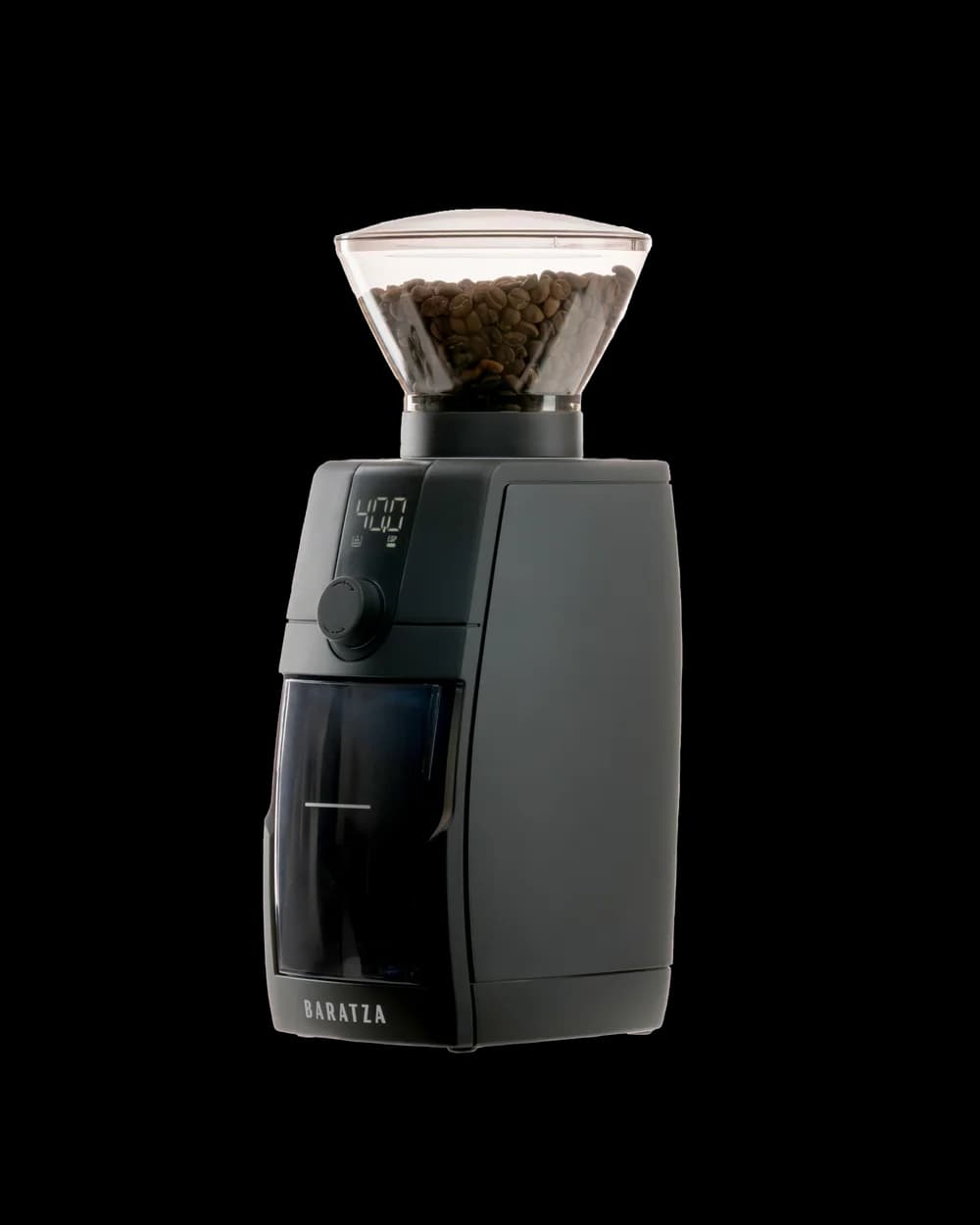
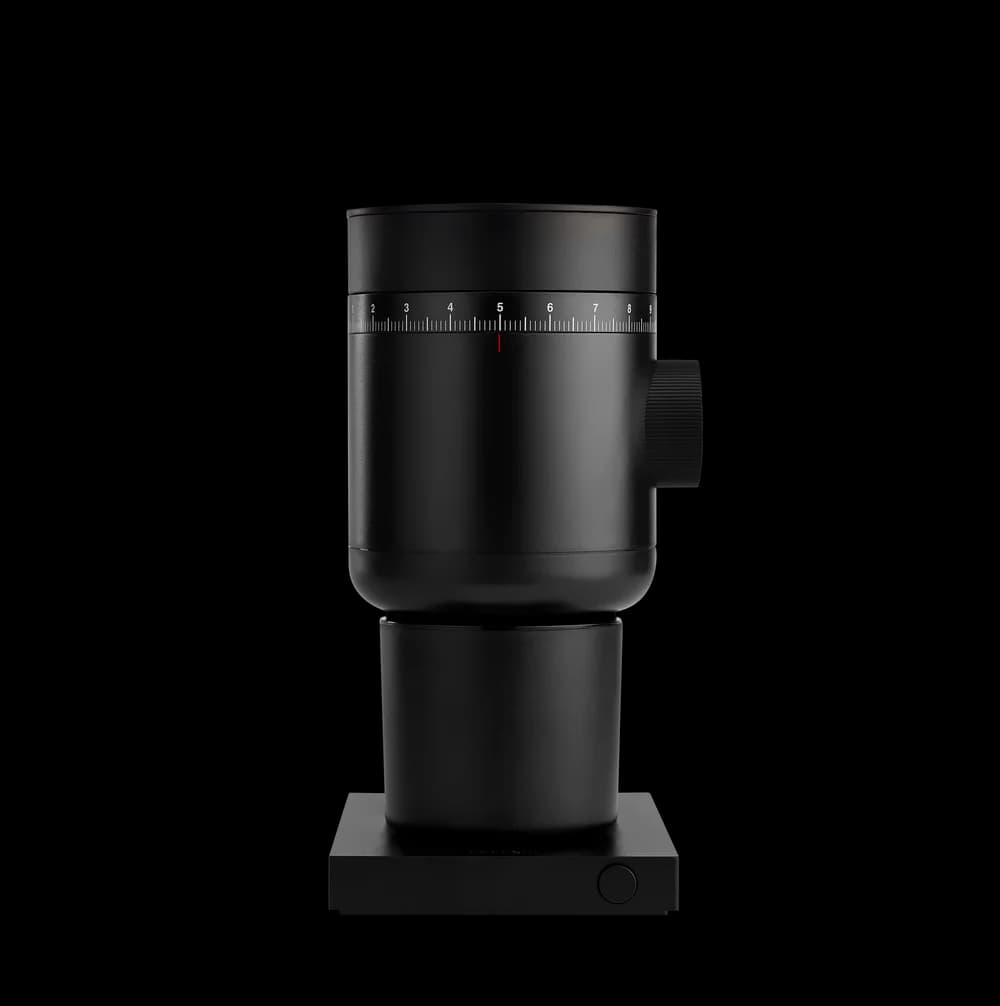
Product photographs: Baratza and Fellow. Black Encore ESP Pro ZCG595 and black Opus 2 pictured. Beans are styling props; these are grinders, not coffee brewers.

The useful home test is a round trip: dial in espresso, grind for a filter brew, then return to espresso. Below is a settings worksheet for that routine. It helps you compare the controls you will use every day without treating a manufacturer’s low-retention claim as a measured result.

This comparison is specifically ESP Pro versus Opus 2. An Encore ESP listing is not a cheaper color of the Pro, and an original Opus guide is not the instruction sheet for Opus 2. Check the full product name before comparing offers or following an adjustment tutorial.

Compare the controls you will actually repeat

Set grind size

Encore ESP Pro
Stepless collar; setting shown on display
Opus 2
External stepless dial across the brew range

Single dose

Encore ESP Pro
Pre-weigh beans; Single Dose Mode stops when empty
Opus 2
Pre-measure beans; normal press starts automatic-stop grinding

Timed routine

Encore ESP Pro
Dedicated Timer Mode; timer adjustable in 0.1-second increments
Opus 2
Guide describes a long press for a 45-second run; not the same timer interface

Espresso transfer

Encore ESP Pro
Dosing cup, tray and adapter in the quick-start guide
Opus 2
Included espresso cup for 54 mm and 58 mm portafilters

Filter transfer

Encore ESP Pro
Grounds bin for larger doses
Opus 2
Separate brewed-coffee catch cup

Change recipes

Encore ESP Pro
Record display setting plus dose and timer/mode
Opus 2
Record dial position plus dose and cup

Clean burrs

Encore ESP Pro
Unplug; use the brush and model-specific disassembly guide
Opus 2
Unplug; brush burrs; follow Opus 2 removal instructions

What remains separate

Encore ESP Pro
Scale, brewer, coffee and brewing accessories
Opus 2
Scale, brewer, coffee and brewing accessories

Auto-stop detects the end of grinding; it is not a built-in weighing system. Timer increments describe the control, not a guarantee of repeatable grams or shot quality.

US comparison reviewed October 21, 2026, using current manufacturer pages, the Encore ESP Pro North America quick-start guide and Opus 2 guides. We have not measured retention, noise, grind speed, particle distribution or taste. Encore ESP, Encore ESP Pro, original Opus and Opus 2 are distinct models.

Encore ESP Pro: record a setting and choose a dose mode

The Pro combines stepless adjustment with a displayed grind setting. Its two operating modes serve different habits: single dosing starts with beans you have weighed, while Timer Mode stops after the selected time. Pick the habit first, then assess the interface. A timer is useful for repeating a routine, but changing beans or grind size can change the amount delivered in the same time.

For a household switching brew methods, the display gives you something specific to put in your notes. Record the setting together with the bean, dose and brewing result. Returning to the same number is a starting point for a check brew, not proof that today’s shot will behave exactly like the last one.

Baratza’s Pro quick-start chart gives different starting ranges for espresso, pour-over and drip brewing. Use that chart for this model rather than importing an Encore ESP number or copying another owner’s recipe. Follow the current instructions when moving the adjustment collar; do not force a control against trapped beans.

WhichCapsule note: The black ZCG595 Encore ESP Pro is the product linked here. The original Encore ESP is discussed separately below, without substituting its offer.

Opus 2: one external adjustment route, two catch cups

Fellow’s second-generation Opus uses an external stepless adjustment system. Its support page explicitly distinguishes this from making additional adjustments inside the grinder. That matters when older Opus tutorials appear in a search: follow Opus 2 guidance for the grinder in front of you.

The included cups serve different transfers. The brewed-coffee cup collects grounds for your filter brewer; the smaller espresso cup is designed for transfer into compatible 54 mm and 58 mm portafilters. Check your own basket and portafilter before treating that as universal compatibility. A compatible cup does not mean a portafilter or espresso machine comes in the box.

The normal button press starts grinding and automatic stopping. The guide also describes a longer press for a 45-second run. That is different from the Pro’s adjustable timer workflow. If you want a measured dose, weigh it rather than asking either stopping method to stand in for a scale.

WhichCapsule note: The buying card is black Opus 2, not the first Opus. We do not transfer measured performance or original-model adjustment instructions between them.

Use this espresso–filter–espresso settings worksheet

Create three entries in a notebook or phone note: Espresso A, Filter B and Return A. For every entry record the date, bean and roast information available, grinder model, exact control position, beans in, grounds out, chosen mode, and brewing recipe. On the Pro add the displayed setting and any timer duration. On Opus 2 add the dial position and catch cup used.

For Espresso A, also record your basket, coffee dose, beverage yield and shot time using one consistent timing convention. For Filter B, record the brewer, filter, coffee dose, water amount and observed brew time. These are your observations, not numbers this article has measured. A short taste note should describe what you experienced rather than declare a universal winning setting.

Before switching, save the first position and use the manufacturer’s procedure to move to the new range. After grinding Filter B, record the second position. Then return toward your saved espresso setting, prepare a check dose and compare Return A with Espresso A. If it differs, adjust one variable at a time and update the record.

Leave a line for any extra coffee you use while checking the change. Do not assume there is zero carryover, prescribe an invented purge weight or promise a waste-free switch. If this round trip feels too involved every morning, keeping one brew method as your daily default may help more than choosing between these two grinders.

WhichCapsule note: Copyable fields: date | bean | model | setting/photo | mode/time | beans in | grounds out | brewer/basket/filter | recipe/yield | brew time | taste | next change. Keep separate rows for Espresso A, Filter B and Return A.

Already own an Encore ESP? Keep it if it does the job

The original Encore ESP remains a separate ownership decision. If you already get the espresso and filter results you want and can repeat your settings comfortably, a new model name does not create a problem to solve. Write down the friction first: do you want a displayed setting, a different dose-control routine, or simpler adjustments between your actual recipes?

Compare that specific need with the new grinder’s documented controls. Do not buy the Pro merely because an article calls both products Encore, and do not assume a Pro setting transfers to your ESP. If your difficulty comes from changing beans, basket dose or brew recipe at the same time, the worksheet is worth trying before replacing hardware.

Cleaning and retention: keep the evidence separate

Both manufacturers provide access and brushing instructions for the burr area. Unplug before cleaning or disassembly, keep liquids away from burrs and internal grinding parts, and follow the correct model’s reassembly instructions. Fellow’s Opus 2 manual also excludes dishwasher cleaning. Access for brushing is a practical feature; it does not establish how many minutes either grinder takes to maintain.

Baratza markets anti-static technology and Fellow describes low retention. We have not weighed retained grounds or tested static under matching beans, humidity and doses. Those claims therefore do not settle which grinder wastes less coffee in your kitchen. Record beans in and grounds out consistently if that difference matters to you, without treating a single dose discrepancy as a full retention study.

Keep room to remove the hopper or load bin and catch cup, reach the adjustment control and use the brush. Check the exact US version, box contents and current seller when buying. Compare the complete station, including a suitable scale and the brewer you already own, rather than adding duplicate equipment.

What people actually ask

Can both grinders cover espresso and filter coffee?

Yes, both manufacturers describe that grinding range. You still need a suitable brewer and a recipe for each method; changing the grind setting alone does not complete the switch.

Does auto-stop mean the grinder weighs the coffee?

No. Automatic stopping and timed operation are different from weighing. Use a separate scale when your recipe needs a measured coffee dose.

Does Opus 2 use the original Opus inner adjustment system?

Fellow describes Opus 2 as using external stepless adjustment across its range without the original model’s additional internal adjustment routine. Use the Opus 2 guide for this generation.

Can I copy a setting from Encore ESP to ESP Pro?

Do not assume settings transfer between models. Use the ESP Pro starting guide and dial in for your own beans, dose and brewer. Save the original ESP’s settings separately if you keep it.

Which grinder has lower measured retention?

We have not performed a matched retention test, so this comparison does not name a measured winner. Manufacturer claims about anti-static features or low retention are not our test results.

Should I replace an Encore ESP that already works for me?

Only if a specific change in controls or workflow solves a problem you actually have. Try recording settings and keeping the brewing variables consistent before buying a replacement.

Choose for your repeatable routine

  • Encore ESP Pro: you value the displayed grind setting and want to choose between single-dose and adjustable timer modes.
  • Opus 2: you prefer its external adjustment and dedicated espresso/filter catch-cup routine.
  • Existing Encore ESP owner: keep a working setup unless the new controls address a specific daily frustration.

The bottom line

I would choose on the adjustment and dosing routine I could repeat, then use the three-entry worksheet to manage espresso/filter changes. Neither a stepless label nor automatic stopping guarantees the same cup without checking the dose and brewing result.

For the rest of the station, see Bambino Plus vs Barista Express, built-in vs separate coffee grinder and whole beans vs capsules. They address the equipment and coffee format choices around this grinder decision.

Pods for this machine

Start with the right pods for either system

Original machines take only Original pods and Vertuo machines only Vertuo pods. A variety pack is the cheapest way to find the coffee you will reorder.

Ready to buy? Check today's Amazon prices

Black Friday deal alerts

Get the Nespresso Black Friday deals by email

One short email when the real machine and bundle discounts start, and one for Cyber Monday. No spam, no sharing your address.

Comparing machines now? Our Black Friday machine and bundle guide explains which machine and bundle to watch.

Keep exploring

View all guides

Privacy choices

We use optional analytics to improve WhichCapsule and advertising/affiliate scripts to support the site. Essential cookies keep country and language preferences working.